COOKmate - My recipe organizer
- 4.7
- Rating
- 1.00M
- Installs
- Free
- Price

 Analysis by App-foxy
I like recipe apps that stay out of the way. When I am cooking, I do not want a social feed, a complicated meal-planning system, or a screen full of unrelated recommendations. I want to find a recipe, keep it readable, and save useful ideas for later. That is the space COOKmate - My recipe organizer tries to fill. It is a free Food & Drink app from Maadinfo Services, built around collecting and managing recipes rather than turning cooking into a community activity.
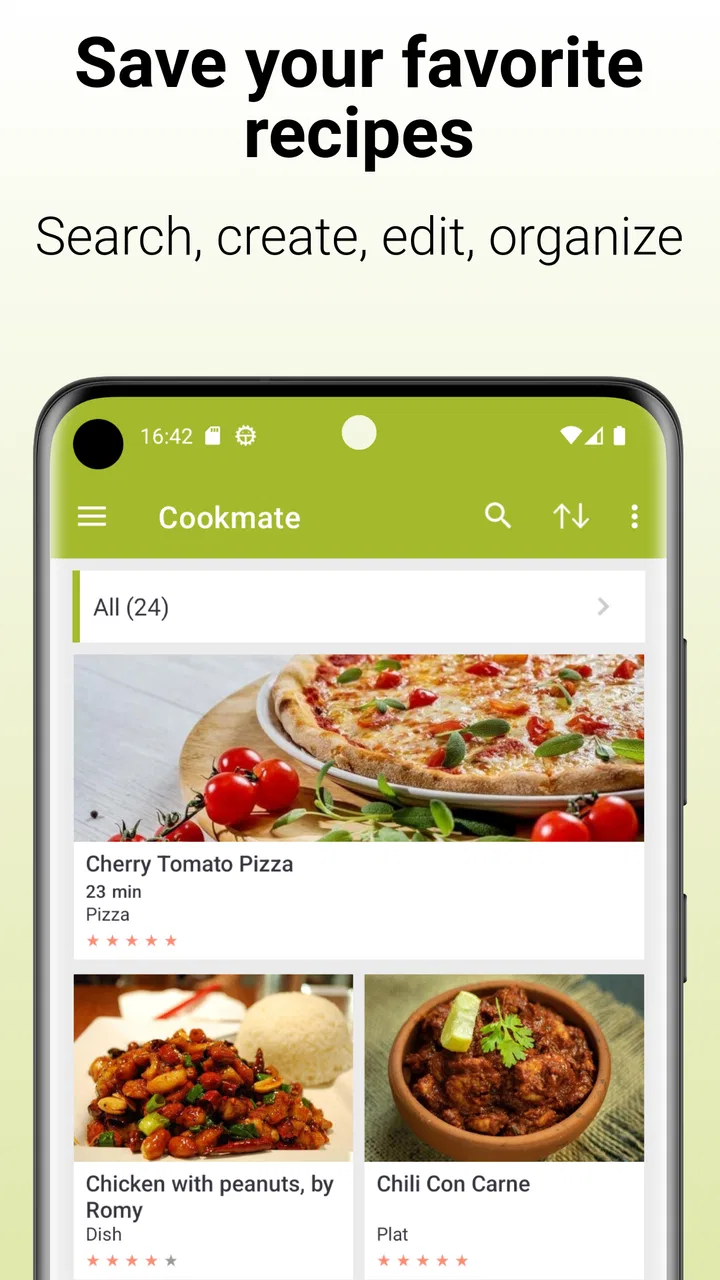
After using it as a personal recipe shelf, I found its main appeal easy to understand: it gives scattered recipes one home. You can search through your collection and bring recipes into the organizer instead of leaving them buried in browser bookmarks, messages, notes, or screenshots. That sounds simple, but it solves a real everyday problem. The challenge is that a recipe manager depends heavily on clean setup and consistent organization. If imported material is messy, or if you expect a polished meal-planning service, the experience can feel less smooth than the basic idea suggests.
Getting recipes into one dependable kitchen library
The first useful decision is to treat this app as a personal archive, not as a complete cooking ecosystem. Its store summary focuses on storing favorite recipes, with search and import tools at the center. That means I would start by adding the recipes I actually cook, not by trying to recreate every recipe I have ever seen online. A smaller, useful collection is easier to search and much more valuable than a huge pile of untested entries.
You May Also Like

 Blood Strike: 2.5 Anniversary
Blood Strike’s Loadouts Turn Every Drop Into a Tactical Gamble
A close look at Blood Strike’s custom loadouts: how fast access to signature weapons reshapes its battle royale rhythm, rewards preparation, and narrows the gap between fights.

 Pandora - Music & Podcasts
Pandora’s Music Is Easy to Start, but Harder to Recover
Pandora’s strength is its low-effort path from a seed to a station. Its weak spot is how much confidence it asks you to place in connection, setup, and quiet recovery.

 8 Ball Pool
 Is Built on Rivalries, Rematches, and Routine
A close look at the rivalries, rematches, shared routines, and unanswered safety questions that turn a quick pool match into a persistent mobile community.

 Samsung Music
’s Quiet Strength Is Playing What You Already Own
Its reach comes less from spectacle than from dependable access to a personal library. That simplicity is both the app’s strongest retention engine and its ceiling.

 AccuWeather: Weather Radar
AccuWeather Review: A Quick, Clear Forecast for Everyday Decisions
For everyday plans, the best forecast is the one you can understand quickly. AccuWeather makes rain timing, radar, and local conditions easy to act on, with a few trade-offs.

 Hill Climb Racing
Why Hill Climb Racing Still Turns Crashes Into One More Run
A tiny car, a bumpy hill and one more upgrade: Hill Climb Racing keeps resurfacing because its simple chaos makes every near-miss feel personal.
More From Our News Desk



One place users may get stuck is the difference between saving a recipe and making it genuinely usable. An imported recipe can contain the right ingredients while still needing a quick check for headings, quantities, serving notes, or preparation steps. I recommend opening each important recipe immediately after importing it and reading it from top to bottom. This catches awkward formatting before you are standing at the counter with flour on your hands.
Search is most helpful when your saved recipes have recognizable names and consistent wording. I found it practical to search by the main ingredient, the dish name, or a distinctive phrase rather than relying on broad terms such as “dinner.” If I save several versions of the same dish, adding a clear personal distinction to the title makes later retrieval much easier. “Chickpea curry” is useful; “Chickpea curry, quick weekday version” tells me more when I am hungry and in a hurry.
The best way to use COOKmate is to build a recipe library you can trust, not merely a collection you can fill. That distinction matters because the app’s strongest feature is organization. It does not remove the need to judge whether an imported recipe is complete, understandable, or suitable for the ingredients you have available.
Why setup quality affects the whole experience
A recipe organizer becomes frustrating when the first batch of saved recipes is inconsistent. Before importing a large group, I would test the process with two or three recipes from different sources. Check whether the title is clear, whether ingredient lines remain readable, and whether the instructions appear in a sensible order. If one source imports cleanly and another does not, that is useful information: you can keep the reliable workflow and manually tidy the exceptions instead of assuming every recipe will behave identically.
It is also worth deciding how you will handle personal changes. If I reduce sugar, replace an ingredient, or discover that a cooking time is too long, I want that knowledge attached to the recipe I actually use. A recipe manager is more valuable when it reflects your kitchen rather than preserving an untouched copy of somebody else’s instructions. I would add a short note to the recipe title or body where appropriate, while keeping the original dish name recognizable for search.
Users also commonly wonder whether the app is suitable for recipes collected from different places. In practical terms, that is one of its most appealing roles, because the import and search focus supports a mixed collection. Still, mixed sources bring mixed formatting. A recipe copied from a clean page may need little attention, while one with long introductions, unusual measurements, or scattered instructions may require editing before it becomes comfortable to cook from.
A simple test before relying on it for dinner
My setup check is straightforward. I save one recipe I already know well, search for it using a short keyword, open it again, and compare the ingredients and method with the original. Then I try the same process with a recipe I have never cooked. This checks both retrieval and readability. If the second recipe is confusing, I fix it while I still remember why I saved it.
I would also test the app in the exact situation in which I plan to use it. If the phone will sit on a kitchen counter, open a recipe there and scroll through the full method. If I usually cook from a tablet or switch between devices, I would confirm that my chosen collection is available where I need it before deleting other copies of important recipes. This is not about creating unnecessary work; it is about avoiding a last-minute scramble.
Because the app is free, it is easy to try without committing money at the beginning. It is rated for Everyone, which makes it approachable for a household recipe collection shared among different ages. Optional in-app purchases range from a small amount to a considerably larger per-item amount, so I would look carefully at what any purchase unlocks before paying. The free starting point is enough to judge whether the organizer fits your habits.
Recovering when a recipe or search does not behave as expected
When an imported recipe looks wrong, I would not immediately assume the entire app has failed. First, I would reopen the entry and inspect whether the problem affects one recipe or several. A single untidy result often points to the source material rather than the organizer itself. If the recipe is important, manual cleanup may be faster than repeatedly importing the same page and hoping for a different result.
Search problems deserve a similar approach. Try a shorter term, the main dish name, or an ingredient that definitely appears in the entry. Very specific searches can fail simply because the saved wording differs from the wording you remember. I find it useful to search broadly first and then scan the smaller result set. Once the recipe is found, its exact title becomes the best phrase to use next time.
If a recipe appears to be missing, I would check whether it was actually saved as a completed entry rather than only viewed during the import process. Then I would search using a distinctive ingredient and review nearby titles. Duplicate entries can also create the impression that one version disappeared when it was saved under a slightly different name. Keeping one preferred copy and removing or clearly labeling alternatives avoids this confusion.
For a large collection, recovery is easier when you work in small batches. Import a handful, check them, and only then continue. This makes it possible to identify the point where a problem begins. It also prevents a common mistake: spending a long time importing recipes and discovering later that many of them need the same manual correction.
Making the app useful during a real week
Here is the everyday scenario in which I think the app makes the most sense. On a Sunday evening, I search my saved collection for meals based on ingredients already in the cupboard. I open a few candidates, remove recipes that require a special shopping trip, and choose one for a busy weekday. Because the recipes are stored together, I spend less time searching through old messages and browser tabs. The benefit is not dramatic automation; it is reduced friction at the moment when I normally lose patience.
Another good use is preserving family recipes that exist in several forms. I might import a typed version, add my own adjustments, and keep a second version for a different serving size or dietary preference. Clear naming is essential here. If two recipes are nearly identical, include the meaningful difference in the title so you do not open the wrong one while cooking.
The app can also work for someone who cooks from a small rotation. In that case, I would not spend time importing everything. I would save the meals I repeat, the recipes I want to improve, and a few reliable options for unexpected guests. Search then becomes a practical shortcut instead of a library-management chore.
On the other hand, people who want automatic weekly menus, grocery-list coordination, nutrition analysis, or a lively recipe community may find this approach limited. Those needs belong to a broader kind of cooking service. COOKmate’s focused organizer model is appealing precisely because it does not try to be all of those things, but that focus means another app may be better if planning is your main goal.
When the app is not the cause of the problem
Recipe apps are often blamed for difficulties that begin elsewhere. If a page has changed, contains incomplete instructions, or uses an unusual layout, importing it may produce an imperfect result even when the organizer is functioning normally. The same applies to a recipe that was already vague in its original form. A missing oven temperature or unclear serving instruction is a content problem, not something search can repair.
Device conditions can matter too. A screen that locks quickly, glare on the display, or poor kitchen placement can make any recipe app unpleasant to use. I would adjust the phone’s position, keep the recipe open before starting, and avoid relying on a recipe that I have not checked in advance. If the app feels slow only with one enormous collection, testing a smaller group can help separate an organization issue from a broader device problem.
It is also important to distinguish an app issue from a cooking judgment issue. Imported recipes may use unfamiliar measurements, regional ingredient names, or instructions that assume prior knowledge. Before cooking for someone with allergies or dietary restrictions, I would verify every ingredient independently rather than trusting a saved recipe simply because it is in my library. A recipe organizer stores information; it does not replace careful checking.
Users who expect every recipe to remain synchronized across all possible devices should think about their own backup habits before making the app the only home for irreplaceable family recipes. I would keep especially important originals somewhere else until I am satisfied that my collection is safely arranged for my routine. That is sensible housekeeping for any digital archive, not a criticism unique to this app.
Who will appreciate it, and who should skip it
I would recommend it to cooks who have recipes scattered across websites, notes, screenshots, and messages, and who want a dedicated place to search them. It is also a good fit for someone who prefers building a private, practical collection over browsing endless new content. The long presence of the app, released in late July of 2010, and its broad reach of over a million installs suggest that the basic idea has remained useful to many people.
The public response is encouraging as well, with an average rating of 4.7 from around forty-five thousand ratings and roughly five and a half thousand written reviews. I would treat that as a sign of a satisfied user base rather than a guarantee that every import or workflow will suit me. Recipe organization is personal: one cook wants careful manual control, while another wants automatic planning and shopping support.
I would skip it if my priority is discovering trending recipes, communicating with other cooks, or having a fully guided cooking course. I would also hesitate if I dislike tidying imported information. The app’s value grows with a little organization, so users who want everything to be automatic may prefer a service designed around ready-made plans instead of personal archiving.
My practical verdict after using the organizer
COOKmate works best when I use it as a dependable cupboard for recipes: save the dishes that matter, check them once, name them clearly, and rely on search when the week gets busy. Its free entry point makes trying that workflow easy, while the Everyone age rating keeps it suitable for a shared household collection. Maadinfo Services has kept the concept focused on the part many cooks actually need: finding and keeping recipes without forcing a larger system on them.
The trade-off is that importing is not the same as finishing. Some recipes may need inspection or cleanup, and the app is not the right answer for users seeking advanced meal planning or social discovery. I would begin with a small, carefully chosen set, test the search process, and keep a separate copy of anything irreplaceable until my routine feels reliable.
For me, that makes the app a sensible recommendation for the recipe hoarder who wants order, the busy cook who repeatedly loses good ideas, and the family that needs one searchable collection. It is less convincing for anyone looking for a fully automated kitchen assistant. If your main problem is scattered recipes rather than a lack of cooking inspiration, this focused organizer is worth trying.
FAQs for COOKmate - My recipe organizer
01What features does COOKmate offer for organizing recipes?
COOKmate provides a robust set of features designed to streamline your recipe management. You can import recipes from websites, manually input your own, and categorize them for easy access. The app also allows you to create shopping lists, plan meals, and even adjust ingredient quantities based on serving sizes.
02Is COOKmate available on both Android and iOS platforms?
Yes, COOKmate is available for download on both Android and iOS devices. This cross-platform availability ensures that you can access your recipes and meal plans seamlessly, regardless of the device you are using, making it convenient for users who switch between operating systems.
03How user-friendly is the COOKmate interface?
COOKmate boasts an intuitive and user-friendly interface that caters to both novice and experienced users. The app's design prioritizes ease of navigation, with clear categories and a simple layout, allowing you to quickly find recipes, plan meals, and organize your shopping lists without any hassle.
04Does COOKmate support recipe sharing with others?
Yes, COOKmate allows users to easily share their favorite recipes with friends and family. You can share recipes via email or social media, making it simple to spread culinary inspiration and collaborate on meal planning with others, enhancing the community aspect of cooking.
05Are there any subscription fees or in-app purchases in COOKmate?
COOKmate offers a free version with basic features, but also provides premium options through in-app purchases. These premium features might include advanced meal planning tools, additional recipe storage, and ad-free browsing, giving users the flexibility to enhance their experience based on individual needs.
Pros
- User-friendly interface for easy navigation.
- Offline access to saved recipes.
- Customizable meal planning feature.
- Ability to import recipes from the web.
- Supports multiple recipe formats.
Cons
- Limited sharing options for social media.
- No built-in grocery list feature.
- Ads may be intrusive for some users.
- Requires manual input for nutritional info.
- Limited support for multimedia content.

COOKmate - My recipe organizer
Gallery